Engineer: The Strange Choices of Sonnet 4.6
This post is about how much I dislike the choices Claude Sonnet 4.6 made when writing the code for this game.


Recently, I've been playing a lot of Librarian: Tidy Up the Arcane Library! – a game in which you clean up and re-organize around 3,000 books about magic, dungeons, and other odds and ends. That sounds like it should be dreadfully boring, but it isn't; it's shockingly delightful and addictive and you should most definitely go buy and play the game.
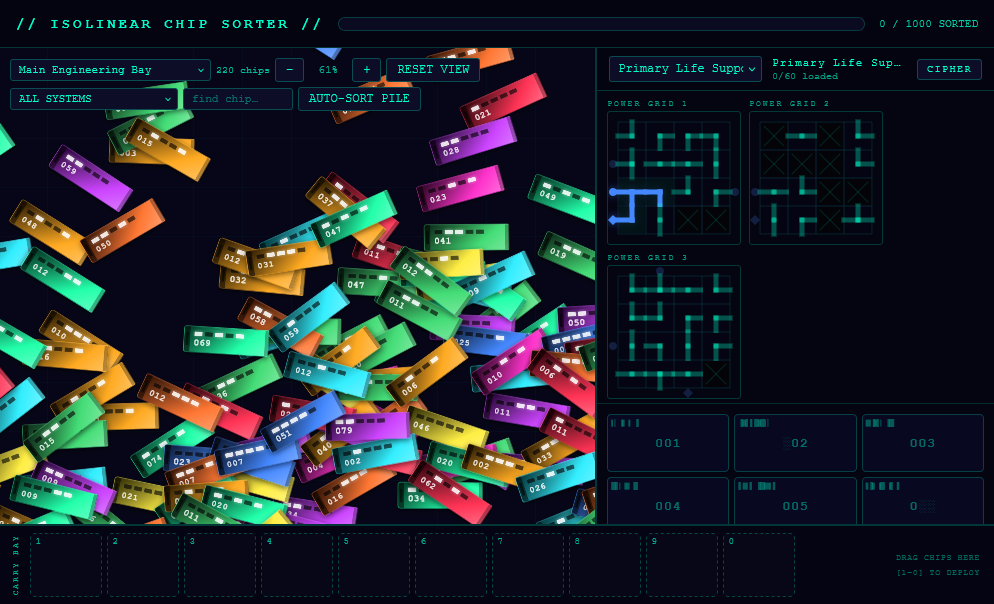
I suspect there's good potential in a sci-fi version of this where you tidy up scattered computer chips / memory rods / sci-fi data widgets and slot them back into panels to restore the systems on a space ship. I'm also pretty sure the experience of running around the 3D space that makes up the arcane library is a key part of what makes Librarian so much fun, and a sci-fi version would probably also need to be built in 3D to really work.
But I was looking for a project to test out Claude Code in Claude Desktop...
Now, unlike Codex and Cursor, Claude Code doesn't have a free tier, so in the interests of being budget conscious I thought I would start out with a model not quite at the cutting edge: Sonnet 4.6 – the best you can buy at the ... I'm not sure how to categorize the pricing model ... at the "not more than $3 per million base input tokens" pricing tier.
This project got off to a very clunky start, with Claude churning for around 20 minutes on the initial prompt (I'm somewhat inclined to think I ran into some abnormal slow-down; I've used Sonnet a fair bit in other contexts and not experienced nearly as much lag). It did build a pretty robust and functional game though, and eventually I'll have it deployed somewhere and they'll be a link to play it and maybe I'll talk about some of the interesting successes that I came across in this project... but this post has a run-down looking cover image, so it's not about that.
This post is about how much I dislike the choices Claude made when writing the code for this game.
Interesting choice right out of the gate: just one file. A single .html file with all the styles, markup, and JavaScript lumped together. Now, to be fair, splitting a project into just three files is by no means the height of organization but I had gotten very used to it from the other projects in this "series" (?) and it does, at least, provide some separation of concerns to build off of.
So yes, the first draft of Engineer is a single 1,900-line HTML file. And we are not going up hill from there.
A common warning / complaint about code written by AI – especially when it has been fully "vibe coded" – is that while you might get something functional it will just be a giant pile of slop no one will ever be able to maintain. I've been finding this a bit confusing because my experience has been much better; most of the AI-written code I've generated or encountered is roughly fine. It's not perfect, and in the case of some of the other projects I've discussed here those JavaScript files can get much longer than I'd like, but they've remained fairly well organized. I could understand them and make changes to them, it was just a very awkward thing to navigate through.
In my day-to-day this has been true of code from Sonnet models too; mostly it fits into the shape of the code around it and is fine – not generally anything special, but fine.
This setup is obviously leading to a reveal about the code in this project, so here it is: It's brutal. I understand the genesis of those warnings and complaints now.
Without any other code to guide or constrain it, Sonnet 4.6 is deeply opinionated and it's opinions are wrong.
It has a ceaseless hatred of line breaks and spaces:
#hotbar{height:80px;background:#040412;border-top:2px solid #00ffcc33;display:flex;align-items:center;padding:0 14px 0 12px;gap:8px;flex-shrink:0;z-index:20}
function gaussRand(mean,sd){let u,v,s;do{u=Math.random()*2-1;v=Math.random()*2-1;s=u*u+v*v;}while(s>=1||s===0);return mean+sd*u*Math.sqrt(-2*Math.log(s)/s);}
Except when it randomly thinks aligning things might be helpful:
if (el) {
  el.style.left      = c.x + 'px';
  el.style.top       = c.y + 'px';
  el.style.transform = 'rotate(0deg)';
  el.style.zIndex    = maxZ;
}
if (pow) { ctx.shadowColor='#00ffcc'; ctx.shadowBlur=6; ctx.strokeStyle='#00ffcc99'; ctx.lineWidth=2; }
else      { ctx.shadowBlur=0; ctx.strokeStyle='#00ffcc55'; ctx.lineWidth=1.5; }
My friend, the good ship Readability left the harbor long ago; this is not helping anything.
It also made a strange range of choices about variable names, some of which are okay-ish:
const HAZARD_SAFE_MARGIN = 15;
It's a bit of a surprise that this value is degrees and not, say, pixels, but there is a comment above it so it's manageable. On the other hand, any guesses about what the function named _shP might do?
I'm sure you figured it out. It converts normalized 0-1 coordinates into pixel space. For the shield display. sh for shield, P for pixel (at least, that's my best guess) and _ for a vague notion of being a sort of private function.
Here we get a more or less sensible name for an element that is a grid of things:
const gridsEl = document.getElementById('eq-grids');
But not ten lines later:
const cv = document.createElement('canvas');
What was wrong with canvasEl? And what are we doing here:
const eq_ = equip[eqId];
This variable name is used twice and in both cases it refers to an object that describes a single piece of "equipment" in the game (things which have slots you need to put science chips into). I guess eq isn't the worst choice here – though it is awfully vague – but what's the plan with that extra underscore at the end?
At first, I thought this was some artifact of this code being re-written or updated at some point since eq_ isn't actually used. I'm not sure why you wouldn't just remove it but maybe adding an underscore at the end is an option.
But the second time this name appears it is used, so apparently the underscore doesn't indicate used-ness. Why is it there? I suppose we'll never know. It's just part of the mysterious black-boxes that are LLMs.
Alright: I don't want to under-sell what Sonnet accomplished here too much. This was a non-trivial project. There are hundreds of draggable objects on screen that you can rotate and re-arrange, grid based puzzles that require you to rotate cells, a free-form graph puzzle with rotating nodes, and sound effects generated entirely in the browser. It all works. You can interact with all of it in the way that was intended and some bits are surprisingly fun (spoiler: it's the little grid puzzles).
But the code underneath is baffling; it's a strange mix of not-too-bad and eye-wateringly confusing.
But as I said above, it's also the exception for me to see code like this. It does suggest that the slightly older models do really benefit from having existing code to integrate into. In my experience so far newer models have less of a problem with this – their code is better organized and more consistent even without an existing code-base; I imagine it will mostly just continue getting better with time.
I'll end here and leave you with this aggressively compact code that wires up the connections in the grid puzzles – it's even got a recursive IIFE. Very sassy.
const vis=Array.from({length:N},()=>Array(N).fill(false));
const par=Array.from({length:N},()=>Array(N).fill(null));
(function dfs(r,c){
  vis[r][c]=true;
  [0,1,2,3].sort(()=>Math.random()-.5).forEach(d=>{
    const nr=r+DR[d],nc=c+DC[d];
    if(nr>=0&&nr<N&&nc>=0&&nc<N&&!vis[nr][nc]){par[nr][nc]={r,c};dfs(nr,nc);}
  });
})(src.r,src.c);